
Appearance
Elements tab
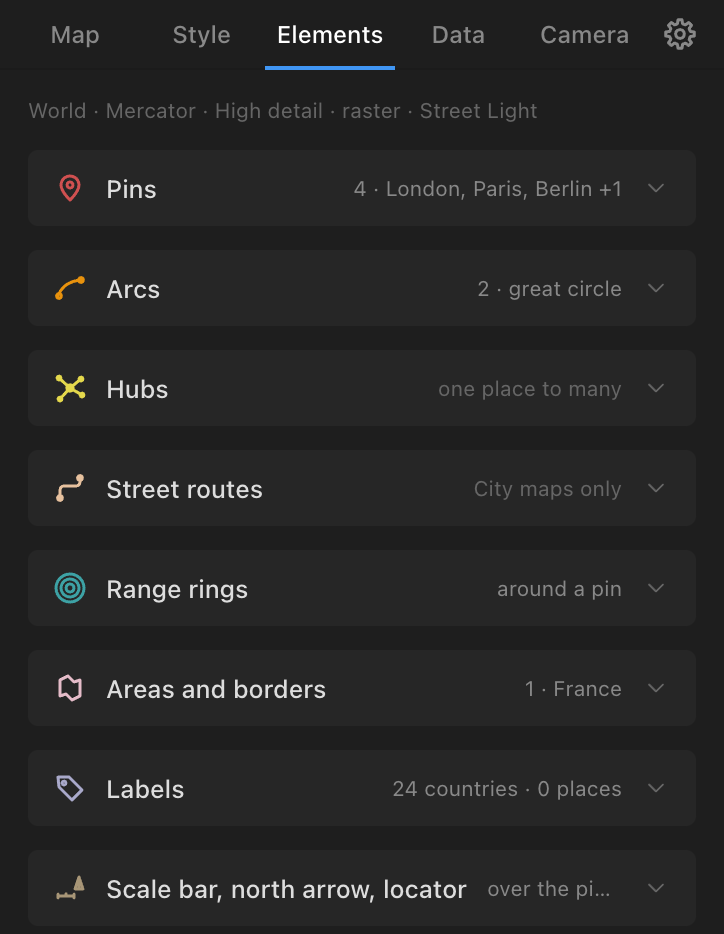
Things placed on the map by hand. A headline names the map ("World · Mercator · Medium detail · Street Light", or "No Atlas map in the active comp yet"). Sections, in order, each with a live summary of what the comp holds: Pins, Arcs, Hubs, Street routes (City maps only), Range rings, Areas and borders, Labels, Scale bar, north arrow, locator. One section is open at a time. Distances use one units setting for the whole panel (km or miles).
Pins
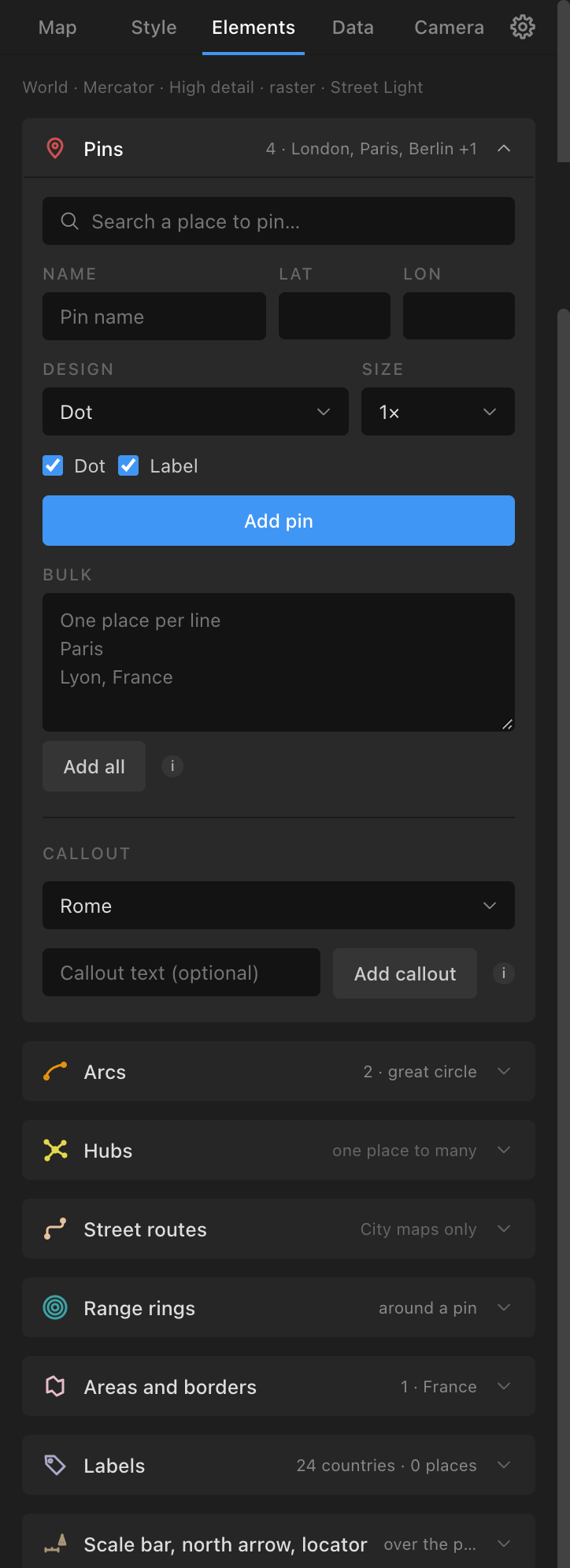
- Search a place to pin…: bundled towns and cities first (name, country, capital, population), then online results through Photon after three letters (when online search is on in Settings). Picking fills Name, Lat, Lon; or type them.
- Design: Dot (default), Drop pin, Ring pulse (animates), Beacon (animates), Flag, Callout, Numbered badge (a Number field, counting up after each add), Photo frame, Square, Diamond, Crosshair, Star, Custom comp… (any comp of yours; a layer in it named "Atlas Anchor" marks the point, else its centre). Designs are template comps in an "Atlas Pins" folder, tinted with the style's pin colour: edit a template to change every pin of that design. A Photo frame gets a comp of its own with a "Photo" solid to replace with your picture.
- Size: ½×, ¾×, 1× (default), 1½×, 2×. Dot (for the Dot design) and Label (both ticked).
- Add pin. A pin is
Pin: {name}, a null with Latitude, Longitude and Visible sliders, and children· Dot,· Marker,· Label. Its label picks the side with room. Adding a pin of the same name updates it in place (its arcs and rings stay attached). - Bulk: one place per line ("Paris", "Lyon, France" narrows to a country), Add all; names not found stay in the box. A file of places goes through Data → Import a file → Pins.
- Callout: a pin, optional text ("Callout text (optional)": the pin's name if empty), Add callout: a box with a leader line, parented to the pin, drawing on with the pin.
- There is no colour field in the section: pins take the style's pin colour (a CSV row can give a pin its own colour; see Data).
Arcs and Hubs
Arcs connects pins in a chain: pick two or more pins as chips, in order (A → B → C).
- Draw as: Line (default), Particles (a stream of moving particles along each path, drawn by the Atlas Particles effect), Both (the lines draw on, then particles flow along them). Particles and Both need the plug-in.
- Shape: Great circle (default: the flight path; live on the globe, Mercator and equirectangular), Straight, Curved (with Bulge, 0.25).
- Height (%) (when the comp has a map; on a globe for great circles only): the Map Root's Height slider. On the globe great circles lift off the sphere; on a flat map arcs rise into the air towards a tilted camera ("Height shows through a tilted camera (Camera tab)"). Their particles rise with them.
- Curved adds Bend (Auto, Left, Right: Auto bows each line to the side that crosses the others least, the curved arcs already in the comp included), Streams (1 to 24 nested curves between the same two places, each a step further out, each with its own particles) and Spacing (%) (the gap between streams). A family never crosses itself.
- Draw-on (s) (1.5), Stagger (s) (1; 0.2 in Hubs), Traveller (a dot riding the line's head).
- Line options (folded): Line (Solid, Dashed, Dotted, Dash-dot, Marching dashes (animated) with Flow px/s), Taper (No taper, Taper out, Taper in, Taper both ends), Arrowhead (No arrowhead, Arrow, Chevron, Dot, Square) and At (Destination, Both ends, Origin), Hand-drawn. Arrowheads grow in as the line draws.
- Distance label: with km or miles, Flight time (850 km/h), Count up as the line draws (on). The distance is live (it changes if a pin's sliders move); under 10 it shows a decimal.
- Connect {n} pins. Layers:
Arc: {A} → {B}per leg,Arc: A → B · Label,Traveller: A → B; particlesATLAS Particles: {first} → {last}. Connecting the same two pins again replaces the arc.
Hubs is one place to many: Hub (a pin), Direction (Out from the hub, In to the hub), then the places as chips in the order the lines should appear (All / None), with every Arcs option; Connect {hub} to {n} places. Each line is an ordinary arc. For a hub with some families of streams and some single lines, connect twice.
Street routes
City maps only.
- From and To: a place by name ("A place, or lat, lon"; Atlas adds a pin there first), a pin (the "Pick a pin" list or the chips), or "lat, lon".
- Draw as: Line, Particles, Both. Draw-on (s) (2), Traveller, Line options (as arcs), Length label with units and Count up.
- Route along the streets: the shortest path along the loaded streets (
Route: {A} → {B}). - Or name the streets, in order: "Eastgate Street, Foregate Street" and Highlight streets (names must match OpenStreetMap's).
- Elevation profile: pick a route, Add profile: a graph in the bottom-left corner from the AWS terrain heights, with ascent and descent and a marker riding it as the route draws (
Elevation: …). - A route is drawn for the build view: a view-changing rebuild removes it with a note (add it again).
Range rings
Pick a pin, Radii (km) (default "250, 500, 1000"), Add rings: Rings: {pin}, true-distance circles around the pin, each ring a Radius N km slider you can keyframe (a ring that grows). Live on the globe, Mercator and equirectangular (they follow the pin and the Root); baked on other projections.
Areas and borders
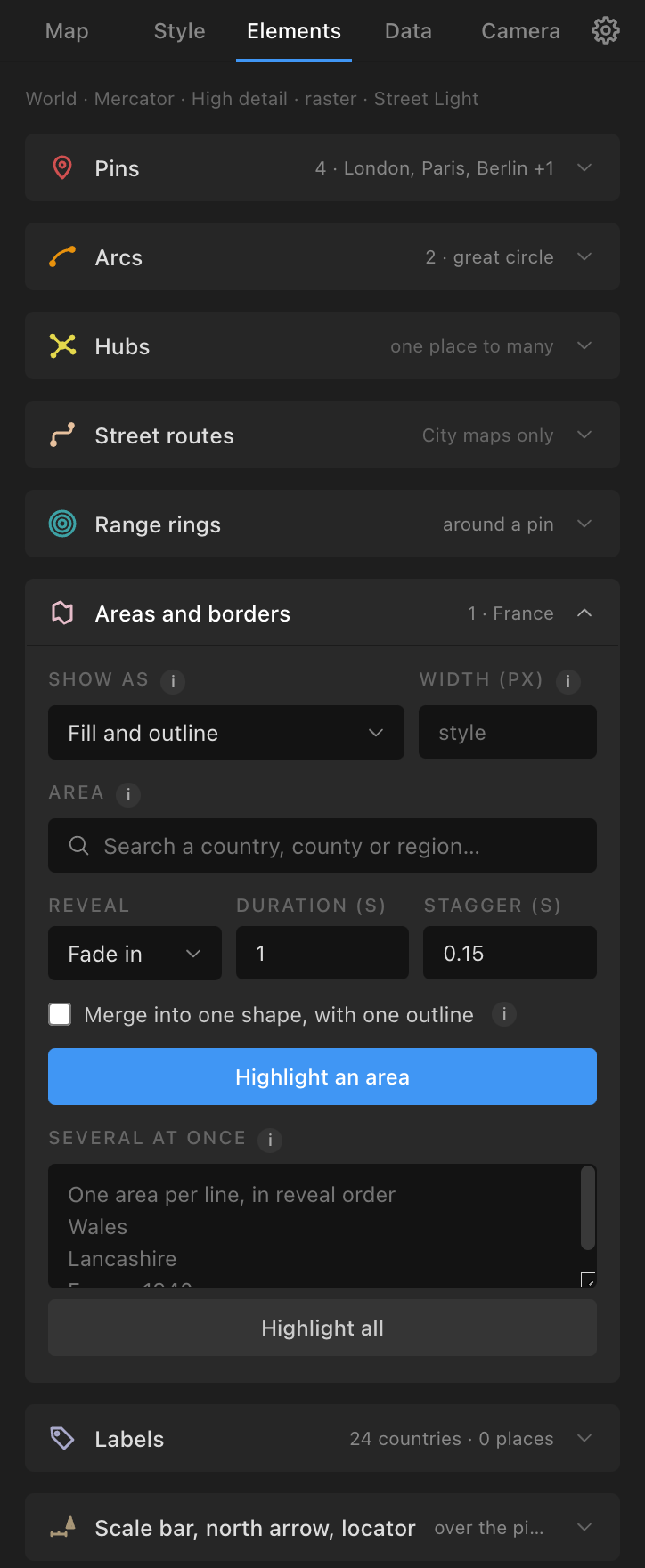
Highlight or outline any area.
- Show as: Fill and outline (default), Outline only (a border round the area, nothing inside), Fill only, Spotlight (everything else dims). Width (px) for the outline (empty: the style's width).
- Area: one search ("Search a country, county or region…") over countries, 4,596 states and provinces (counties, départements, Länder, US states, by name, English name, postal or ISO code), the nations and regions they make (Wales, Scotland, England, Northern Ireland, Greater London, Île-de-France, the US census regions…) and groups of countries (EU, Eurozone, Schengen, NATO, G7, G20, BRICS, ASEAN, GCC, OPEC, Mercosur, African Union, Commonwealth, Five Eyes, Nordic). A country found by name offers "Every state or province of {country}". Picks become chips and can mix kinds.
- Reveal: Fade in (default), Wipe, Draw stroke, then fill, Pop from centre, No animation; Duration (s) (1), Stagger (s) (0.15).
- Include bordering countries. Merge into one shape, with one outline (ticked for a nation, region or group; the borders between members dissolve) and Name of the merged shape.
- Highlight / Outline / Spotlight {area} builds it:
Highlight: {name}orSpotlight: {names}, placed above the map and under pins, arcs and labels. - Several at once: one area per line ("Wales", "Lancashire", "Córdoba, Argentina", "France 1940"). A line with a year or date reveals in date order over Dates over (s) (5): a war's spread from a list. Misses stay in the box with "did you mean".
- Areas follow the Root on the globe, Mercator and equirectangular. Apply Style recolours them and keeps what they show; a rebuild re-emits them.
- The Map preview's click and its button build an area too (see World: the preview).
Labels
- Country names and Capitals (ticked), Avoid overlaps (ticked), Name every country in view.
- World maps also: States and provinces, Rivers (along their course), Contour heights (along the index contours; needs Contour lines), Lakes, Airports (IATA codes), Ports; Cities over {100k+, 250k+, 500k+, 1m+, 5m+} people.
- Add labels:
Label: {text}, laid out to avoid each other and the pins and labels already there; a name with no room is dropped (the status counts them). Point labels are live (Latitude, Longitude, Visible sliders; hidden on the far side of the globe). Adding again replaces labels of the same kinds. A pin of the same name already labels its place. - City maps: Street names (Major roads only, At most 40, Name the streets: text along the road, one per name where it fits); Districts, water and peaks (Add labels); Points of interest as pins (categories Transport, Parks and nature, Culture and sights, Food and drink, Health, Shops, Education, Hotels; Design By category or one design; At most 30; Pin them).
- Path labels (street, river and contour names) are drawn for the build view; a view-changing rebuild removes them.
- Under a camera, labels and pins keep their size on screen and stay level as the camera turns (Camera options).
Scale bar, north arrow, locator
2D pieces over the picture, each with a corner (Bottom left, Bottom right, Top left, Top right) and Add / Update / Remove:
- Scale bar (bottom left; Miles and feet): a bar that relabels itself in round distances as the Root or the camera zooms (
ATLAS Scale Bar). True at the map's centre. - North arrow (top right): north at the middle of the map, turning with the camera's heading (
ATLAS North Arrow). - Locator inset (bottom right): a small world map in its own comp with a frame that follows this map's view (
ATLAS Locator). - Detail inset (top right): Of the map centre or a pin, Closer × (4): a closer map of one place in its own comp, placed in the corner, with its frame drawn live on the main map (
ATLAS Inset,ATLAS Inset frame).