
Appearance
Map kinds
The kind of map decides what moves when the ATLAS Map Root's sliders are keyframed, how fast it plays and what Update map can do. Plan animations from this topic.
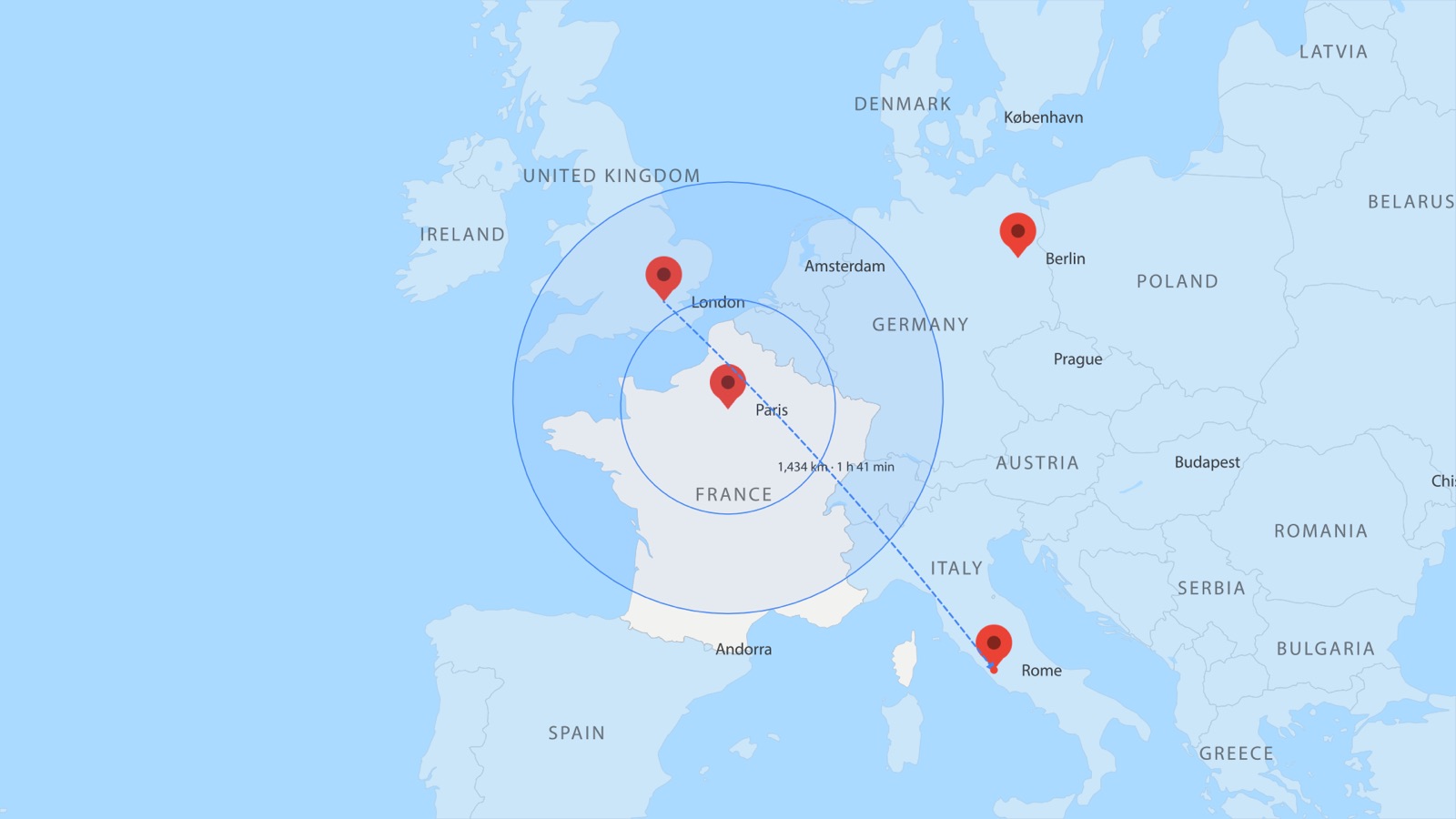
A map tour at its Paris stop: France spotlit, range rings round Paris, a marching arc from London to Rome.
World and City
| World | City | |
|---|---|---|
| Data | Natural Earth v5.1.2, bundled, offline | OpenStreetMap vector tiles: OpenFreeMap online (cached) or a .pmtiles region file |
| Scale | the whole world to a region (scale 150 shows the world on 1080p, 480 a globe filling the frame, 900 Europe, 4,600 the UK) | z4 (countries) to z16; z14 is streets |
| Projections | Mercator, Equirectangular (Plate Carrée), Orthographic (globe), Robinson, Natural Earth, Winkel Tripel, Miller, Azimuthal Equidistant, Transverse Mercator (tall countries), Conic Equal Area (wide countries) | Web Mercator only |
| Layers | classes such as Ocean, Land, Countries, Country borders, Coastline, Lakes, Rivers, States / provinces, Ocean depth, Elevation bands, Contour lines | Land cover, Land use, Parks, Water, Aeroways, Buildings, Waterways, roads by class, Railways, Boundaries |
| Street detail | a raster Mercator World map can deepen into OpenStreetMap streets where the animation zooms in (Street detail when zoomed in) | always streets |
A World map and a City map share the same maths: a City map is a Mercator georeference whose scale is the slippy zoom, so pins, arcs, labels, areas and the camera work the same on both.
Raster image or Vector shapes
Build the map as: Raster image | Vector shapes on the Map tab (and the City view). Raster is first and the default; the choice is remembered.
- Raster image: the map's classes from the same data and style rendered to one image (
ATLAS Map (raster)on World;ATLAS Plate z{zoom}on City), with sharper zoom levels added by Update map where the animation zooms in (ATLAS Map (raster) · level N, cross-fading by the zoom). About 30 to 60 ms a frame while it moves, whatever the detail. Restyled by rendering again (a few seconds). A raster map can be painted on imagery (Raster base). Pins, labels, arcs, areas and data stay live vectors on top. - Vector shapes: every class is an editable shape layer (
ATLAS Countries,ATLAS Coastline…), restyled in place by Apply Style without rebuilding. After Effects redraws every point of a moving shape layer each frame (about 20 ms per 1,000 points), so a moving vector map plays slowly. Best for a still map you will edit layer by layer.
Live or still: what follows a keyframed Map Root
"Follows the Root" means: keyframe Centre Lon, Centre Lat or Scale on ATLAS Map Root (or let a map tour do it) and the map itself pans, zooms or spins.
| Map | Follows the Root? | Notes |
|---|---|---|
| World, Raster image, Mercator or Equirectangular | Yes (the image follows through its transform) | Fast. Update map adds sharper zoom levels where it zooms in, and street detail on Mercator. |
| World, Raster image, any other projection (the globe included) | No: a still image | The camera can move over it. A raster globe does not spin. |
| World, Vector shapes, Orthographic with Live globe: spins with the Map Root ticked (on by default) | Yes: every path is an expression | Spins with Centre Lon, Centre Lat and Roll. Slow to render (about 1 frame a second at 1080p); Bake to PNG sequence plays it at footage speed. |
| World, Vector shapes, Mercator or Equirectangular with Live map: pans and zooms with the Map Root ticked (off by default) | Yes: each layer follows through its transform | About half a second a frame at Low detail. Above Low detail it holds only the area the keyframes visit (Update map extends it). |
| World, Vector shapes, every other case | No: still shapes at the build view | On Mercator, equirectangular and the globe the pins, labels and arcs still move, and Update map rebuilds the map live. On the other projections nothing follows: Bake to PNG sequence renders the map's move, and pins, labels and arcs stay at the build view. |
| City, Raster image | Yes | Update map adds sharper zoom levels. |
| City, Vector shapes | No | Update map offers Update as a raster image. |
What else follows the Root:
- Pins, point labels, arcs, range rings, bubbles, travellers, distance labels: follow the Root on the globe, Mercator and equirectangular (closed-form expressions), whatever the map itself does. On the other projections they hold their places at the build view, even when the map is baked to a moving PNG sequence (a rebuild re-projects them).
- Areas (highlights, spotlights), choropleths, imported boundary layers: follow on the globe, Mercator and equirectangular, still elsewhere.
- Path labels (street names, river names, contour heights) and street routes: drawn for the build view; a view-changing rebuild removes street names and routes with a note.
- Terrain, imagery and day/night backdrops: still plates for the build view; under a keyframed Root they become PNG sequences that follow it. A view-changing rebuild re-renders them.
- The camera moves over everything, whatever the map kind (every Atlas layer becomes 3D).
A rule of thumb: for a map that moves, build a raster Mercator map (or a vector live globe for a spinning globe), animate, then press Update map.
The projections
Ten projections; three of them can follow the Root as live vector maps, and two as raster images.
| Projection (label) | id | Live as vector? | Raster follows the Root? |
|---|---|---|---|
| Mercator | mercator | Yes (Live map) | Yes |
| Equirectangular (Plate Carrée) | equirect | Yes (Live map) | Yes |
| Orthographic (globe) | ortho | Yes (Live globe, on by default) | No |
| Robinson | robinson | No | No |
| Natural Earth | naturalearth | No | No |
| Winkel Tripel | winkel3 | No | No |
| Miller | miller | No | No |
| Azimuthal Equidistant | azeqd | No | No |
| Transverse Mercator (tall countries) | tmerc | No | No |
| Conic Equal Area (wide countries) | conicea | No | No |
Detail
World maps come at three levels of Natural Earth detail: Low · 1:110m, Medium · 1:50m, High · 1:10m. Auto (the default) picks by scale: below 450 Low, below 1,600 Medium, otherwise High; the Performance profile shifts it (Fast one level coarser, Quality one finer); a raster map goes one level finer again (detail costs nothing at playback). A live vector map is capped by the profile (Fast and Balanced: Low; Quality: Medium), and the Map tab says so under the Live tick before you build.