
Appearance
Style tab
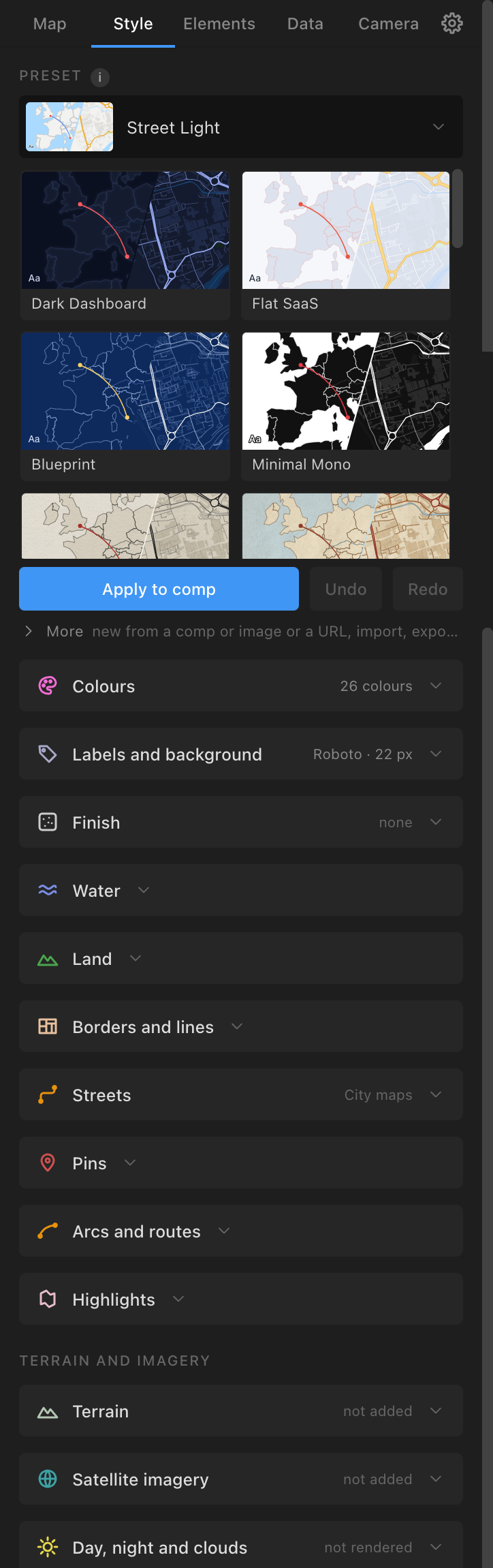
The Style tab is the look of the map: the preset, every colour, width and font, the finish (halos, underlays, dashes, terrain shading, depth, contours, elevation bands, country colours, textures, vignette, glow), and the backdrops that render into the comp (Terrain, Satellite imagery, Day, night and clouds). Top to bottom: the preset block, Colours, Labels and background, Finish, Water, Land, Borders and lines, Streets, Pins, Arcs and routes, Highlights, then the group "Terrain and imagery": Terrain, Satellite imagery, Day, night and clouds. Sections start folded; one style section and one backdrop section can be open at a time.
Presets and Apply to comp
- Preset: a gallery of cards, each drawn from the preset itself. Your own presets follow the shipped ones (tagged "yours"). The tab opens on the active comp's style and edits a working copy of it.
- Apply to comp: saves an edited copy as your own preset first (named as you typed, or "{preset} edited"), makes it the current style, and restyles every Atlas layer in the active comp in place: map classes, pins, labels, arcs, routes, areas, data layers, furniture, legends. Nothing is rebuilt except a raster image, which is rendered again in the new style (a few seconds). Status "{name}: restyled N layers in X s". On a raster map painted on imagery, the style changes the lines, labels, pins and background, not the land and sea (set Raster base to Map colours and build again for the style's own land and sea). A style that adds layers (ocean depth, contours, elevation bands) adds them to a raster map; on a vector map Build Map adds them.
- Undo and Redo: step through your edits to the working copy. These buttons are the supported undo for style edits (on the Mac, Cmd+Z goes to After Effects whenever After Effects has something to undo).
- When the copy is edited or is your own: a name field, Save (keep it without applying) and Delete (your own presets).
- More: From comp / image… (a preset from a client's colours: "Read this comp's colours" or "From an image…", six slots to adjust, "Create preset"); From a URL… (below); Import… (an
.atlasstylefile, a Mapbox GL / MapLibre style JSON, or Mapbox Studio's download zip; a Mapbox Standard style becomes a close relative); Export… (an.atlasstylefile); Keep colours set per pin (ticked: a pin given its own colour keeps it on Apply). - From a URL…: a "Style address" (a MapLibre or Mapbox GL style.json,
mapbox://styles/you/style-idwith your own Mapbox token, or a MapTiler style with your own key; "Remember" keeps the token on this computer) and Fetch the style; or one of the Public styles, no key: VersaTiles' Colorful, Eclipse, Graybeard, Neutrino and Shadow (CC0), and OpenFreeMap's Liberty, Bright, Positron, Dark Matter and Fiord (designs CC BY 4.0: the design credit goes on the map's attribution line). Atlas reads only the style's look (colours, road widths and casings, the font, the names' halo, dashes, hillshade colours): no tiles, sprites or fonts.
The 23 shipped presets, in gallery order:
| Preset | Character | Its finish |
|---|---|---|
| Dark Dashboard | navy-black sea and land, coral accent | a soft glow under the borders |
| Flat SaaS | light grey-blue, warm pinkish borders, coral accent | |
| Blueprint | navy sea, the land as outline only, mono type, yellow accent | dashed states |
| Minimal Mono | black land on a white sea, red accent | |
| Newsprint | cream paper, dark ink, serif type, red | White paper texture |
| Retro Atlas | tan land, pale blue sea, brown ink, Lora | Old paper texture |
| Neon | near-black with glowing violet and cyan lines | glowing lines, vignette, a violet glow round the globe |
| Terrain Natural | sand land, blue sea, olive parks | terrain shading, ocean depth, contours |
| Classic Atlas | the school atlas: light blue sea, soft green land, tan roads | Rough paper, ocean depth |
| Street Light | the everyday web map (Google-like): pale land, light blue water, white roads, yellow arterials | the default for a new panel |
| Street Soft | a softer web map: warm off-white land, cream arterials | |
| Documentary Dark | desaturated slate, amber accents, heavy tracked names, arrows by default | fine film grain, vignette |
| Documentary Light | paper and ink, red accents, hand-drawn arcs by default | Grey card texture |
| Chart Room | nautical: paper land, the sea stepping to deep blue, mono type | terrain, depth, contours, dashed states and boundaries |
| Ink Negative | pale land on a near-black sea, heavy borders knocked out of the land | border underlay |
| Midnight Teal | command centre: deep teal, cyan accent | grain, vignette, a glow round the globe |
| Editorial Grey | pale land on a grey sea, one burnt-orange accent, so data is the brightest thing | border underlay |
| Fieldwork | a physical map in the Imhof manner on rough paper | Rough paper, terrain, depth, contours, dashed states |
| Prairie | warm off-white land, tan roads, grey-blue sea, olive-grey borders | white border knockout, dashed states |
| Dossier | muted cinematic olive on a charcoal sea, gold for front lines and arrows | grain, vignette |
| Hypsometric | the land in nine steps of height, the sea stepping by depth | terrain, depth, elevation bands |
| Political | the school wall map: every country in one of seven bright colours, no neighbours alike | country colours, inside band |
| Political Vintage | the same in muted colours on old paper | country colours, inside band, Old paper, dotted states |
Every preset puts a halo round its names. A custom preset travels with a map built in it (it is stored in the comp), so another machine renders it the same.
Colours and the class sections
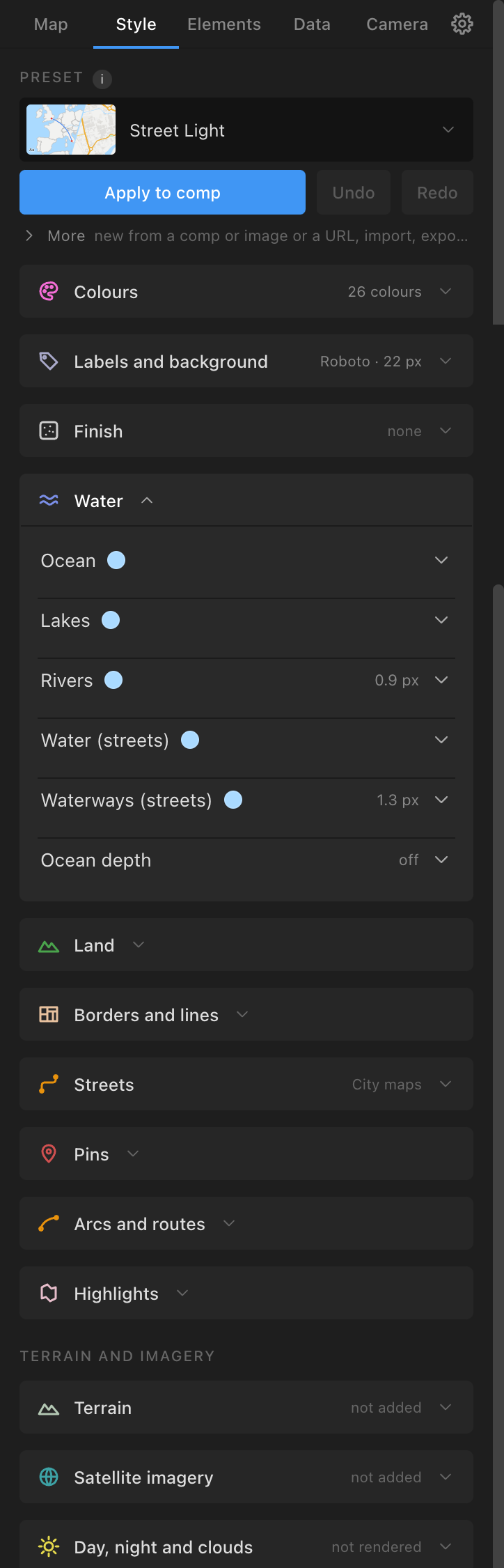
- Colours: every colour the style uses as chips, most used first (a count shows when a colour is used in more than one field). Click one and pick: the new colour replaces the old wherever it appears.
- Labels and background: Background, Text, Size px (at 1080p), Font (a searchable list of installed families) and Style (its faces). A machine without the font falls back silently. Halo: "Halo round the names", with Colour, Width px and Opacity % (a thin outline round every name so it stays legible over borders and colours).
- Water: Ocean, Lakes, Rivers, Water (streets), Waterways (streets); Ocean depth: "Step the sea by depth" with six colours (Shore, 200 m, 1,000 m, 2,000 m, 4,000 m, 6,000 m +).
- Land: Land, Countries, Glaciers and ice, Urban areas, Disputed areas, Parks, Land cover, Land use, Buildings, Aeroways (the last five on street maps); Country colours: One or Many (a palette of 4 to 13 colours, no two neighbouring countries alike; seven follow Natural Earth's seven-colour map); Terrain shading: "Shade the land at Build Map" with Shadow and Highlight colours and opacities, Light from °, Exaggeration; Elevation bands: "Colour the land by height", 2 to 12 bands each with a starting height and a colour; Contours: "Draw contour lines" with Colour, Opacity % and Index px (the interval comes from the map's scale, 1,000 m for a continent down to 10 m for a town; every fifth line is an index line).
- Borders and lines: Country borders, Coastline, States / provinces, Graticule, Time zones, Major roads, Railways, Boundaries (streets): Stroke, Width, Line (Solid, Dashed, Dotted, Dash-dot) and, except roads and railways, Underlay (a wide soft line under the crisp one: a glow in the line's colour, or a gap in the land colour). Inside band (countries): the outline drawn inside each country's edge (raster maps only; a vector map keeps a centred outline).
- Streets (City maps): Motorways, Primary roads, Secondary roads, Minor roads (Stroke, Width, Casing, Casing w), Service roads, Paths.
- Pins: Pin colour.
- Arcs and routes: Arcs, Street routes, and Arc line defaults (Line, Taper, Arrowhead, At, Flow px/s, Hand-drawn) used by new arcs.
- Highlights: the Highlight fill, opacity, stroke, width and an inside band (drawn on vector and raster maps alike).
Every colour field has a swatch (opens Atlas's own picker), a hex box and a strip of the style's colours. Sizes and widths are 1080p px; Atlas scales them to the comp.
Finish: texture, vignette, globe glow
Finish is the last touch over the whole picture.
- Texture: a card grid: None, then eleven tiles bundled with Atlas (CC0): Canvas, Linen, White paper, Grey card, Crumpled paper, Ribbed kraft, Kraft paper, Rough paper, Old paper, Fine film grain, Coarse film grain; then Add your own… (a seamless PNG or JPEG, remembered by path). A picked tile gets a sensible default: a light paper Multiply 80 % on the map, a film grain Screen 45 % on screen, a mid-tone kraft Overlay 40 %.
- Sits: "On the map (pans and zooms with it)" (default: parented to the Root, it pans and zooms with a tour or a camera, and its grain resets every doubling of zoom through two cross-fading layers, the second one
· octaveand shy) or "On screen (fixed over the picture)". While the map moves, a texture on the map costs about 75 ms a frame, on screen about 20. - Blend (Multiply, Overlay, Soft Light, Screen, Normal), Opacity %, Scale %.
- The texture is
ATLAS Texture: {tile}with a Motion Tile effect, at the top of the stack under the attribution; Atlas keeps it there as pins and labels are added. Apply to comp adds, changes or removes it; a style that names a texture adds it at Build Map.
- Sits: "On the map (pans and zooms with it)" (default: parented to the Root, it pans and zooms with a tour or a camera, and its grain resets every doubling of zoom through two cross-fading layers, the second one
- Vignette: "Darken towards the edges", Opacity % (
ATLAS Vignette, over the map and under pins and labels). - Atmosphere: "Glow round the globe", Colour and Width px (
ATLAS Globe Glow, the globe only). This is a style's glow, not Day, night and clouds.
Terrain (hillshade)
Style → Terrain → Add terrain hillshade lights the land by its own hills from the AWS Terrain Tiles (public, no key; fetched once and cached), as a plate named ATLAS Terrain above the land and imagery and under the lines, labels and pins. Works on World and City maps, any projection.
- Shadow and Highlight: colours with Opacity % (the shadow where a slope faces away from the light, the highlight where it faces it; nothing on flat ground). They start from the style's terrain colours.
- More options: Shading (Tinted colours, default; or the older Grey relief under Overlay, Soft Light, Multiply or Normal), Light from (azimuth, 315 = north-west), Height (the light's altitude, 45), Exaggeration (1.5; raise it for gentle country), Contrast, Image resolution, Keep the sea flat (ignore bathymetry).
- The credit "Terrain: AWS Terrain Tiles (Mapzen, USGS, NRCan, Kartverket and others)" joins the attribution.
- Under a keyframed Map Root it renders a PNG sequence that follows the move. A view-changing rebuild renders it again.
- A style with terrain shading (Terrain Natural, Chart Room, Fieldwork, Hypsometric) adds its own shading at Build Map; a hillshade added here by hand is left alone by builds and restyles.
Satellite imagery
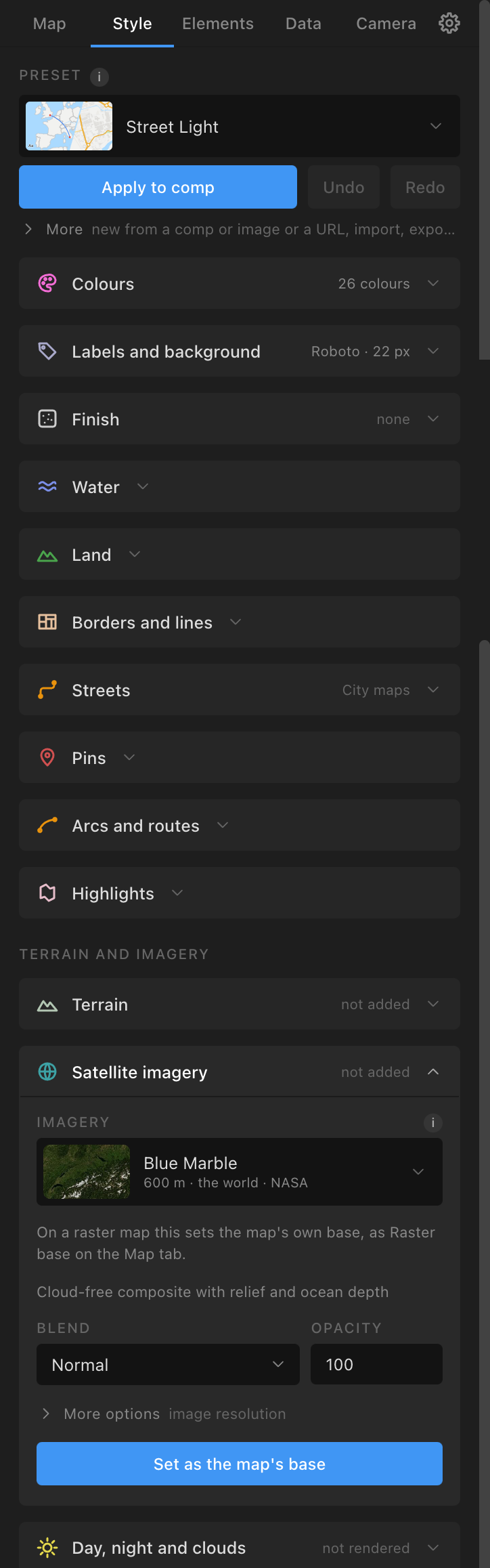
Style → Satellite imagery puts imagery under the map's lines.
- Imagery (card picker, default Blue Marble): Sentinel-2 cloudless 2017 and 2016 (10 m, the world, CC BY 4.0, by EOX); Terrain Light, a styled map (EOX); the five Natural Earth world rasters (3.7 km); NASA GIBS: Blue Marble, Blue Marble Next Generation, Night lights 2012, Night lights 2016, Relief coloured by height, Relief grey, MODIS true colour, daily and VIIRS true colour, daily (a Date field; daily images appear a day or two late and have gaps between orbits); the national aerial surveys where they cover the map (USGS, swisstopo, basemap.at, PDOK, IGN PNOA, IGN France, ČÚZK, Geoportal.gov.pl; sharp to the street); Custom tile URL (a
{z}/{x}/{y}template of a service you are entitled to use, your own credit line and max zoom; a key in the address is yours and goes only to that service). - Blend (Normal, Overlay, Soft Light, Multiply), Opacity, Image resolution.
- Add imagery backdrop: a plate
ATLAS Imagery: {source}above the fills and under terrain, lines, labels and pins; the credit joins the attribution. Under a keyframed Root it becomes a PNG sequence that follows the move. The same source replaces its layer; different sources stack. - On a raster map the button reads Set as the map's base: the raster map is rebuilt with that imagery inside its image (the same as the Map tab's Raster base). A Custom tile URL still adds a plate.
- Sharpness: NASA layers about 500 m a pixel (country scale), relief 30 to 40 m, Sentinel-2 10 m (to about z13), the national surveys 30 cm. A map closer in than its source's sharpness looks soft.
Day, night and clouds
Style → Day, night and clouds renders NASA's day imagery lit by the real sun, city lights on the night side and a drifting cloud layer, as one picture under the map's lines. World maps only (any projection, vector or raster). It needs no raster base: it draws its own day and night imagery.
- Day imagery: Blue Marble Next Generation (default), Blue Marble (relief and bathymetry), or None (flat night blue). Night lights (VIIRS) (ticked). Clouds (ticked) with Opacity % (70). Sun UTC hour (now, by default; 12 puts noon on the prime meridian) and Day of year (today).
- More options: Twilight ° (6, civil twilight), Range (Whole comp or Work area), Image resolution.
- Render day, night and clouds: the first time, it adds three sliders to the Map Root, Sun UTC Hour, Sun Day of Year and Cloud Offset, set from the panel's values; after that the sliders win (change or keyframe them on the Root, not in the panel). It then samples every frame of the range: if nothing moves (the Root's Centre Lon, Centre Lat, Roll, Scale and the three sliders), it makes one plate; if anything is keyframed, it renders a PNG sequence of every frame (
<project>/Atlas Sequences/<comp>-atmosphere/), so the light and clouds turn with a spinning globe or move with a tour. The layer isATLAS Atmosphere, above the fills and under the lines, labels and pins, credited "Imagery: NASA GIBS". A 1080p frame takes about 0.4 s. - Remove: deletes
ATLAS Atmosphere(the frames stay on disk). - Render it after the animation is keyed: it bakes the move it sees. Change the move, render again.