
Appearance
Map tab
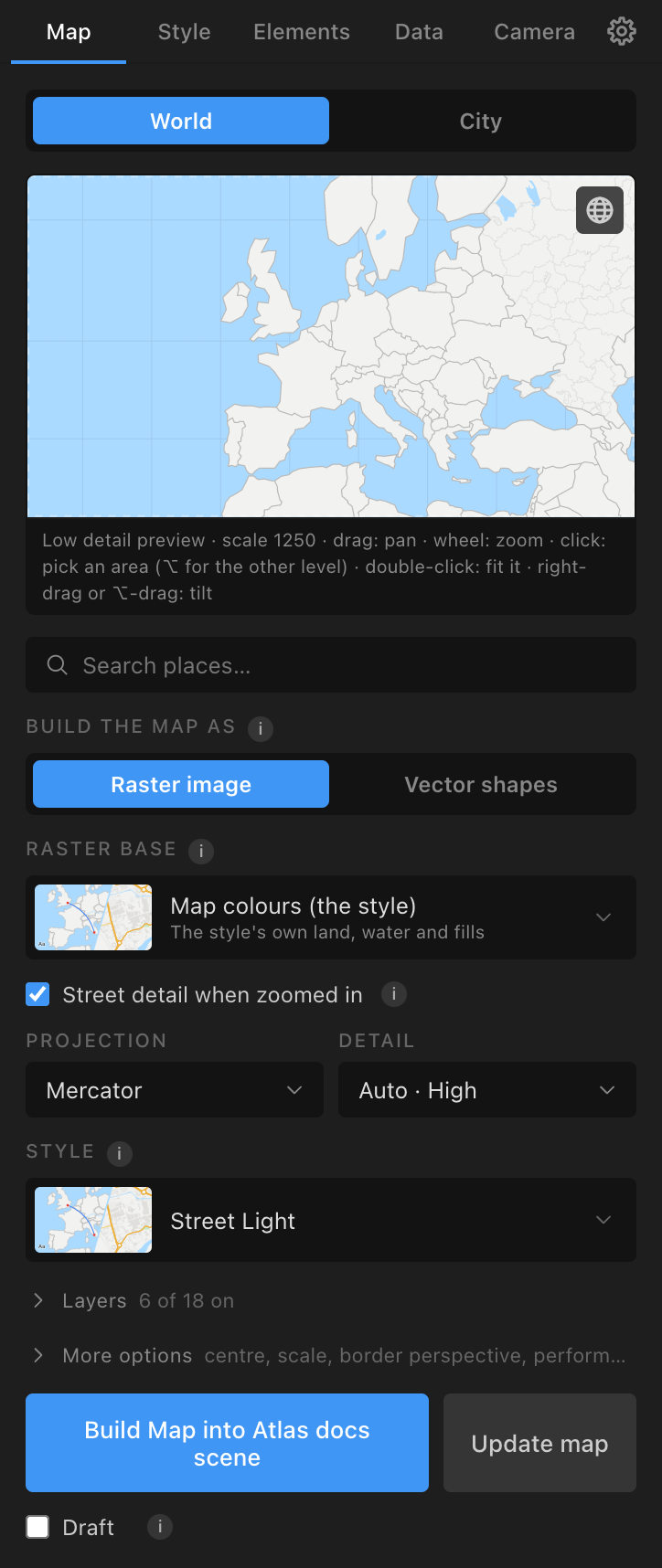
The Map tab builds the map. At its top a switch, World | City, chooses the module. The form remembers itself, and it follows the active comp: open a comp that holds an Atlas map and the tab shows that map's settings, so Build Map rebuilds what is there. Atlas builds into the active comp, or makes a comp called "Atlas Map" when none is open.
World: the preview
The preview draws the map in the chosen projection and style, with the comp frame as a dashed rectangle. The line under it reads "{Low|Medium|High} detail preview · scale {N} · drag: pan · wheel: zoom · click: pick an area (⌥ for the other level) · double-click: fit it · right-drag or ⌥-drag: tilt".
- Drag pans (sets Centre lon and Centre lat). Wheel zooms (scale 50 to 50,000). Nothing is built until Build Map.
- Click picks the area under the mouse: the country, or a state, county or province when the clicked country's largest polygon takes more than 0.6 of the comp frame's width or height (so on a close UK map a click picks Lancashire, on Europe it picks the United Kingdom). Option (Alt)-click picks the other level. A row appears: "Selected: {name} ({label})" with a button that builds it at once: Highlight, Outline or Spotlight, as the Areas and borders section was last set (Elements tab).
- Double-click centres and fits the area under the mouse (fills in centre and scale only).
- Right-drag, middle-drag or Option-drag tilts (up to 60°) and turns the view. A chip "Tilt {t}° · heading {h}° ×" shows; click it to go back to flat. A tilted preview builds with a camera: Build Map adds the camera rig at that tilt and heading and builds the map far enough past the frame for what the camera sees.
- The globe button ("Show the whole world, centred") frames the whole world in the current projection.
Below it: the place search ("Search places…": bundled towns and cities, and online results through Photon) centres the map on a place.
World: build options
In on-screen order:
- Build the map as: Raster image | Vector shapes (Raster image first and the default; remembered). See Map kinds: World or City, raster or vector, live or still.
- Raster base (Raster image only): what the image is painted on. A card picker: Map colours (the style) (default); Sentinel-2 cloudless 2017 (10 m, the world, CC BY 4.0); Terrain Light, a styled map (EOX); the five Natural Earth world rasters ("Natural Earth II: relief, land cover and water", "relief in colours of height", "ocean bottom", "grey relief with the ocean bottom", "grey relief"; 3.7 km a pixel, public domain, fetched once, 11 to 102 MB); NASA's Blue Marble, Blue Marble Next Generation, Night lights 2012, Night lights 2016, Relief, coloured by height, Relief, grey. The style's lines are drawn over the imagery; the credit goes on the attribution layer. (National aerial surveys are offered as a base on City maps, not World maps.)
- Street detail when zoomed in (Raster image on Mercator only; ticked by default): where the animation zooms in to about city scale (z9), Update map draws those zoom levels from OpenStreetMap in the same style, down to z14, so a World map deepens into streets. It needs a connection (or a region file) the first time; offline those levels stay Natural Earth and Update map tries again later. The comp then credits OpenStreetMap. Untick to stay Natural Earth all the way in.
- Projection: Mercator (default), Equirectangular (Plate Carrée), Orthographic (globe), Robinson, Natural Earth, Winkel Tripel, Miller, Azimuthal Equidistant, Transverse Mercator (tall countries), Conic Equal Area (wide countries).
- Detail: "Auto · {level}" (default; shows what it will build), "Low · 1:110m", "Medium · 1:50m", "High · 1:10m".
- Live globe: spins with the Map Root (Vector shapes on Orthographic; ticked by default) or Live map: pans and zooms with the Map Root (Vector shapes on Mercator or Equirectangular; unticked by default). A line under it says what the build will do ("Live at Low detail…", "Will be built still…"). See Map kinds: World or City, raster or vector, live or still.
- Style: the style picker (a row with the current style's thumbnail; click to open the gallery). This is the one current style, shared with the City view and the Style tab. Picking a style that has ocean depth, contours or elevation bands ticks those layers.
- Terrain shading from the style (only when the style has terrain shading; ticked by default): Build Map adds the hill shading. Untick to build without it.
- Layers (folded; "6 of 18 on" by default): the classes to build. Ticked by default: Ocean, Land, Countries, Lakes, Country borders, Coastline. The others: Ocean depth (the sea in six depth steps, bundled), Graticule, Urban areas, Elevation bands (the land in steps of height, traced from terrain tiles), Glaciers and ice, Contour lines (traced from terrain tiles), Disputed areas, States / provinces, Time zones, Rivers, Major roads, Railways. Contours and elevation bands need the network the first time (they are skipped with a note offline).
- More options (folded): Centre lon (default 10), Centre lat (50), Scale (900); Border perspective ("De facto (default)", or a country's own view of its borders: Natural Earth's 31 points of view); Performance for this build only ("Settings (Balanced)", Fast, Balanced, Quality).
World: Build Map, Update map, Draft
- Build Map into {comp}: builds the map. A raster build reports "Built a raster map in {s} s · one image · sharp to {x}× zoom"; a vector build "Built {n} layers, {p} paths in {s} s". Rebuilding replaces the map's layers in place and refits everything on it: pins re-projected, labels laid out again, areas and data layers re-emitted, terrain and imagery re-rendered for the new view. Pins, arcs and labels survive a rebuild and a change of module.
- Update map (beside Build Map; also a bar above the status line whenever the map needs it): reads the whole animation (the Root's keys and expressions, the camera's, tours, Fly to, keys set by hand, a Root dragged or scaled by hand) and rebuilds what is short, as one operation: further out where the camera looks past the map's edge, sharper zoom levels where the Root or camera zooms in, street detail on a Mercator raster World map, a still map rebuilt live when the Root moves it, finer detail on a vector map zoomed in. It says what it will do in one line first ("France to Paris, sharp to ×40: 5 images, about 180 tiles, about 25 s"). It always builds at the profile in Settings. Press it again after any change.
- The bar above the status line appears only while the map needs updating, with the first reason ("The camera looks past the map's edge at 3.2 s", "Soft at 7.0 s: zoomed in 6× past sharp", "Zooms into street detail at 4.0 s", "The map stands still while the Map Root moves (from 2.0 s): Update map builds it live", "Draft map", "The comp is 3840×2160 and the map was built for 1920×1080"), its other reasons in the tooltip, and its own Update map button. When the map is up to date the bar goes.
- "N notes" under Build Map lists what Update map cannot fix: the camera looking past the horizon (tilt less or zoom in); a pull-back wider than a map twice the comp's width; a stack already as sharp as 8192 px footage allows; a raster image on a projection that cannot follow the Root (build on Mercator or equirectangular, or as live vector shapes); a projection with no live form (use Bake to PNG sequence); street scale on a non-Mercator or vector map.
- Update as a raster image appears when a vector map would need it (a vector street map under a moving Root, a live vector map zoomed past the profile's detail, street scale on a vector Mercator map).
- Draft (under Build Map; off by default): Build Map makes a quick draft to animate on (the Fast profile, one image at 1×, no zoom levels); the bar says "Draft map" until Update map makes the finished one.
World: Playback (Bake to PNG sequence)
Playback (folded; Vector shapes only): "bake a moving map to a PNG sequence".
- Range: Whole comp (default) or Work area. Resolution: 1× or 2×. Hide the live map layers once the sequence is in (ticked).
- Bake to PNG sequence: samples the Map Root's sliders on every frame, draws each frame of the map from the bundled data (any projection, contours and bands included), writes
map_00000.png…to<project folder>/Atlas Sequences/<comp>/(beside Atlas's cache for an unsaved project), imports it asATLAS Map Sequencein the map's slot (under pins, arcs and labels) and switches the class layers off. Status "Baked {n} frames in {s} s". - Restore live map: removes the sequence and switches the layers back on.
Use it to play a live globe at footage speed (a live globe renders at about 1 frame a second), or to move a map on a projection that has no live form (Robinson, Winkel Tripel and the rest: keyframe the Root, then bake). On those projections the pins, arcs and labels stay at the build view while the baked map moves, so they belong on a map that stands still. World maps only. A rebuild at a new view removes the sequence. Apply Style does not restyle a baked sequence: bake again after a restyle.
City: the street map
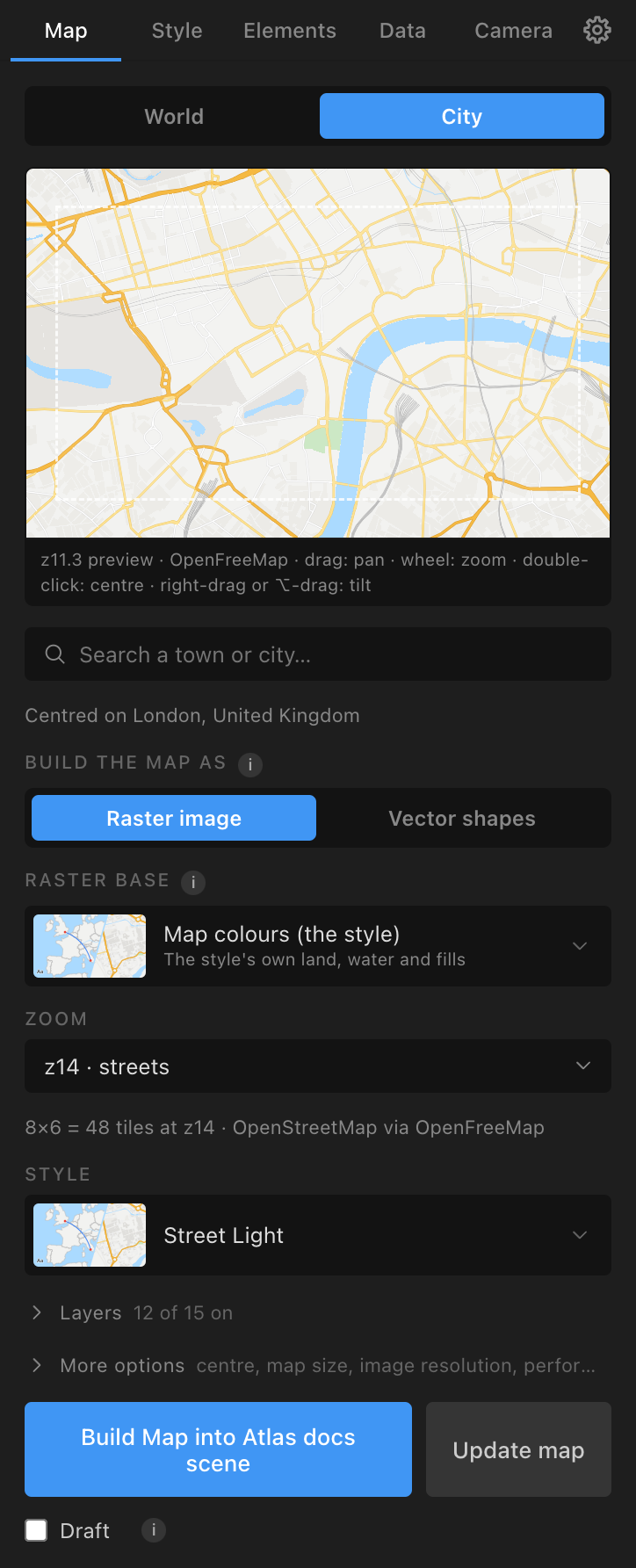
City builds a street map from OpenStreetMap: OpenFreeMap online (no key, cached on disk) or a region file set in Settings.
- The preview is a live map in the current style. Drag pans, the wheel steps the zoom (z4 to z16), double-click centres, right-drag or Option-drag tilts (a tilted preview builds with a camera, as on World maps). Click a road to name it ("street: {name}"); a row offers Highlight street. The status reads "z{zoom} preview · {source}".
- Place search ("Search a town or city…") centres the map.
- Build the map as: Raster image | Vector shapes (shared with World). Raster: every layer that is on goes into one image that follows the Map Root, and Update map adds sharper zoom levels. Vector: roads, waterways and railways are shape layers over a rendered plate of the areas; the map does not follow the Root.
- Raster base (Raster image only): Map colours (the style), Sentinel-2 cloudless 2017, Terrain Light, plus any national aerial survey whose coverage holds the map's centre: USGS National Map imagery (United States, not Alaska, 2 m), swisstopo SWISSIMAGE (Switzerland, 30 cm), basemap.at orthophoto (Austria), PDOK Luchtfoto (Netherlands), IGN PNOA orthoimagery (Spain), IGN France orthophotos, ČÚZK orthophoto (Czechia), Geoportal.gov.pl orthophoto (Poland, 60 cm). Each zoom level takes the imagery at its own sharpness (the world mosaic far out, the national survey close in). Roads and lines are drawn over the imagery.
- Zoom: z4 · countries, z5 · countries, z6 · country, z7 · country, z8 · region, z9 · region, z10 · town, z11 · town, z12 · district, z13 · district, z14 · streets (default), z15 · streets, z16 · detail. OpenFreeMap's data stops at z14; z15 and z16 draw z14 data larger.
- Boundaries up to (when the Boundaries layer is on): Countries (level 2), Regions and states (4), Counties (6) (default), Districts and boroughs (8), Wards and parishes (10). Lines only.
- A tile line: "{nx}×{ny} = {n} tiles at z{z} · OpenStreetMap via OpenFreeMap". Over the profile's budget (Fast 48, Balanced 64, Quality 144 tiles) Build Map is disabled: lower the zoom or raise the profile.
- Style and Terrain shading from the style, as on World.
- Layers (folded; "12 of 15 on"): chips that cycle vector → plate → off (on Raster image: on / off). Defaults: Land cover, Land use, Parks, Water, Aeroways, Buildings on the plate; Waterways, Minor roads, Secondary roads, Primary roads, Motorways, Railways as vectors; Paths, Service roads, Boundaries off. A class over 4,000 paths goes to the plate with a warning.
- More options: Centre lon, Centre lat; Map size 1× or 2× (2× draws the same tiles twice as large, covering half the ground); Image resolution Auto, 1×, 2×, 3× (plate pixels per comp pixel; 2× or 3× stays sharp under a camera zoom); Performance.
- Build Map, Update map, Draft: as on World. There is no Playback on City (a raster street map already follows the Root).
Street names, districts, water names, peaks and points of interest are added from the Elements tab's Labels section; a street route from Street routes.